Audition Management System
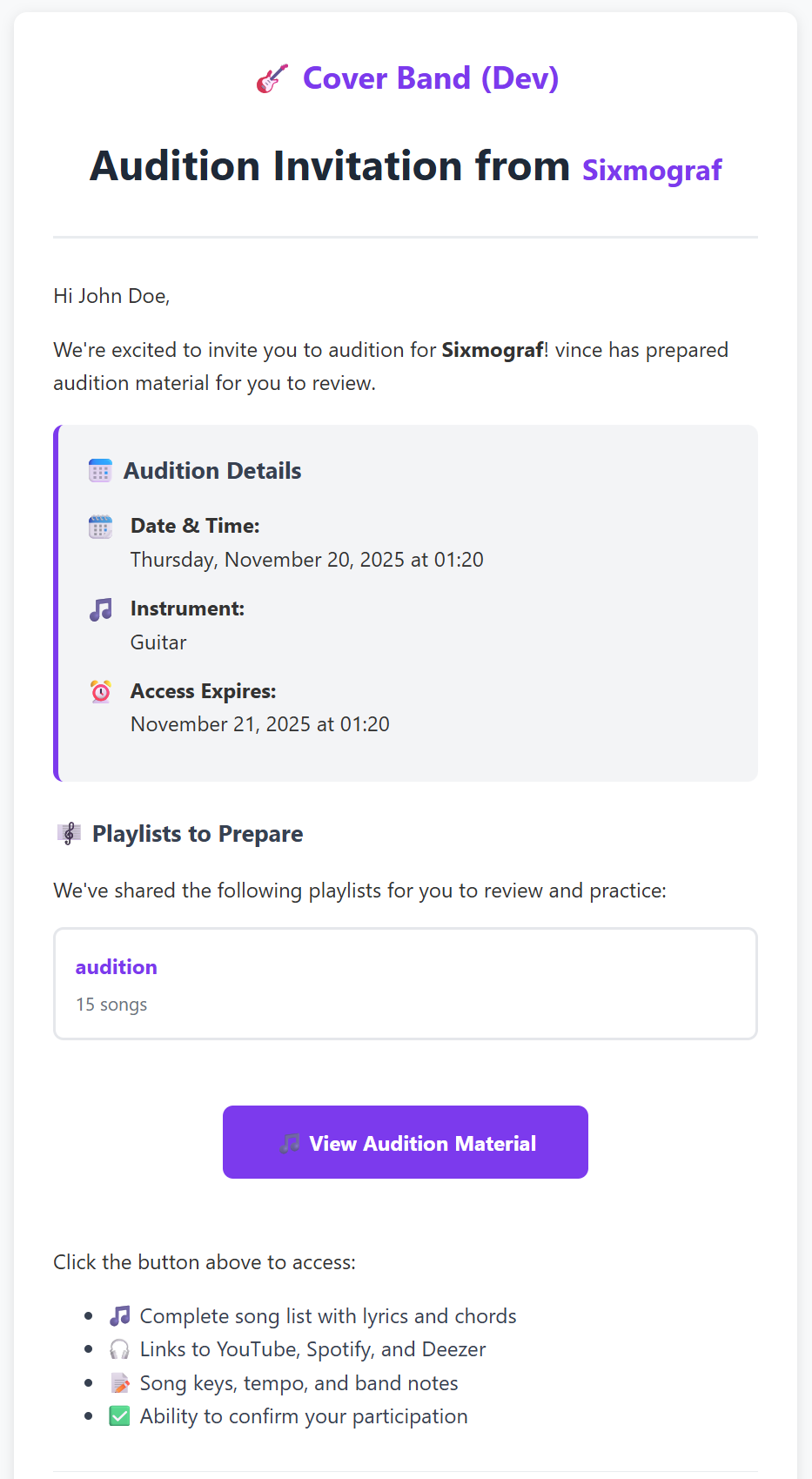
The Audition Management System streamlines the process of inviting, scheduling, and tracking auditions for potential band members. Band members can easily share repertoire, coordinate schedules, and keep the entire band informed throughout the audition process.
Audition Management System
The Audition Management System streamlines the process of inviting, scheduling, and tracking auditions for potential band members. Band members can easily share repertoire, coordinate schedules, and keep the entire band informed throughout the audition process.
Key Features
🎤 Quick Access from Home Page
A dedicated "Plan Audition" button appears right on your home page in the "Upcoming Events" section, giving you instant access to schedule auditions whenever you need.
📧 Professional Email Invitations
Send polished, professional email invitations that include: - Band information and introduction - Audition date, time, and location - Personal message from you to the auditionee - List of playlists they should prepare - Secure access link to view the material
Don't want to share email? No problem! Just copy the secure link and send it however you prefer (text, social media, etc.).
🎵 Share Your Repertoire
Select which playlists you want the auditionee to see and prepare: - Auditionees see full song details: title, artist, duration - They can access YouTube, Spotify, or Deezer links for each song - No account required - they can browse everything via the secure link
📅 Automatic Calendar Integration
Every audition invitation automatically: - Creates a calendar event for your band - Sets 2-hour duration (customizable) - Includes location and audition details - Links to the playlists you shared - Confirms attendance when the auditionee accepts (if they're logged in)
Your entire band sees the audition on the calendar immediately.
🔔 Team-Wide Notifications
Keep everyone in the loop automatically: - Invitation created: All band members get notified when someone schedules an audition - Auditionee responds: Everyone knows when the candidate accepts or views the material - In-app + Email: Notifications appear in the app and via email (based on preferences)
👥 Collaborative Management
All active band members can: - Create audition invitations - View and track all auditions - Edit pending invitations - Resend invitation emails - Revoke access if needed - Convert successful auditions to member invitations
🔒 Secure & Private
- Cryptographically secure 64-character tokens for each invitation
- Automatic expiration one day after the audition date
- Revoke anytime if plans change
- Guest view only - auditionees can't edit or see other band info
- No sensitive data exposed in public views
🔄 Easy Conversion
Once you decide to add the auditionee to your band: - One-click conversion to a full band member invitation - Preserve context - all audition details stay linked - Seamless transition from guest to member
How It Works
For Band Members
- Click "Plan Audition" from your home page
- Fill in audition details:
- Name and email (email optional)
- Instrument they'll be playing
- Date, time, and location
- Personal message
- Select playlists to share
- Send invitation - Email goes out automatically (if provided)
- Copy link to share via any channel
- Track progress - See when they view and accept
- Manage as needed - Edit, resend, or revoke
- Convert to member when you're ready
For Auditionees
- Receive email or direct link
- Click to view audition material (no login needed)
- Browse playlists with full song details
- Access streaming links to listen and prepare
- Click "Accept" to confirm attendance
- Optionally create account for enhanced features
Use Cases
Scenario 1: Finding a New Guitarist
Your band needs a guitarist. You: 1. Click "Plan Audition" from home 2. Enter candidate name: "Alex Thompson", instrument: "Lead Guitar" 3. Schedule for next Saturday at your rehearsal space 4. Share your "Rock Classics" and "Originals" playlists 5. Add personal message: "Looking forward to jamming with you!" 6. Send - Alex gets professional email with everything they need 7. Alex views material, practices the songs, accepts the invitation 8. Calendar event is auto-confirmed with Alex's attendance 9. After great audition, convert to member invitation with one click
Scenario 2: Multiple Candidates
Auditioning several drummers: 1. Create separate invitations for each candidate 2. Share same playlists but personalize messages 3. Track which candidates engage with the material 4. See view counts and timestamps to gauge interest 5. All band members stay notified about each candidate 6. Revoke invitations for no-shows 7. Convert the best fit to member
FAQ
Q: Can auditionees comment on songs?
A: Not yet, but it's planned. Currently they have read-only access to prepare.
Q: What if I don't have the candidate's email?
A: No problem! Email is optional. Just copy the secure link and share it however you communicate.
Q: Can I edit an invitation after sending?
A: Yes, you can edit details while status is pending or viewed. Once accepted, create a new invitation if changes are needed.
Q: How long are invitations valid?
A: By default, they expire 1 day after the audition date. You can manually revoke earlier if needed.
Q: Do auditionees need to create an account?
A: No! They can view everything with just the secure link. However, if they do create an account, their attendance is automatically confirmed on the calendar event when they accept.
Q: What if we have multiple auditions on the same day?
A: Create separate invitations for each candidate. Each gets their own calendar event and tracking.
Q: Can I see which songs they looked at?
A: Currently we track overall view count and timestamp. Detailed song-level analytics may come in future updates.
Q: What happens to the calendar event if I revoke the invitation?
A: The calendar event stays (it's still on your schedule). The invitation link becomes invalid.
Explore More Features
Band Collaboration
Invite members and manage your band with powerful collaboration tools.
Learn more →